
English source · 5 min
Build five apps with Veyndo Commerce
These workshops use App Studio: one visual designer, one Manifest, the same API/MCP gateway and an explicit staging/release workflow. Start with a working pattern or a guided assistant, then change its data and UI. No paid AI call is needed to follow the deterministic examples.
| Workshop | Build | Start with | External service? |
|---|---|---|---|
| 1. Product care advisor | Product editing tab and shopper advice cards | Product advisor pattern | No; optional AI uses configured inference |
| 2. Returns workspace | Private order cases, status and internal notes | Returns workspace pattern | No; refunds are a separate Payments operation |
| 3. Customer preferences | Additional customer fields and translated choices | Admin app assistant | No |
| 4. Daily review reminder | UTC schedule → event → graphical flow | Scheduled automation assistant | Only for optional Slack/email delivery |
| 5. ERP order handoff | Managed mapping UI, order events and service action | ERP handoff pattern | Yes, for actual ERP synchronization |
Earlier worked example: Choose an app pattern or guided assistant in the actual Studio

The earlier worked-example links retain their October capture date. The inline workspace illustration above shows the current interface.
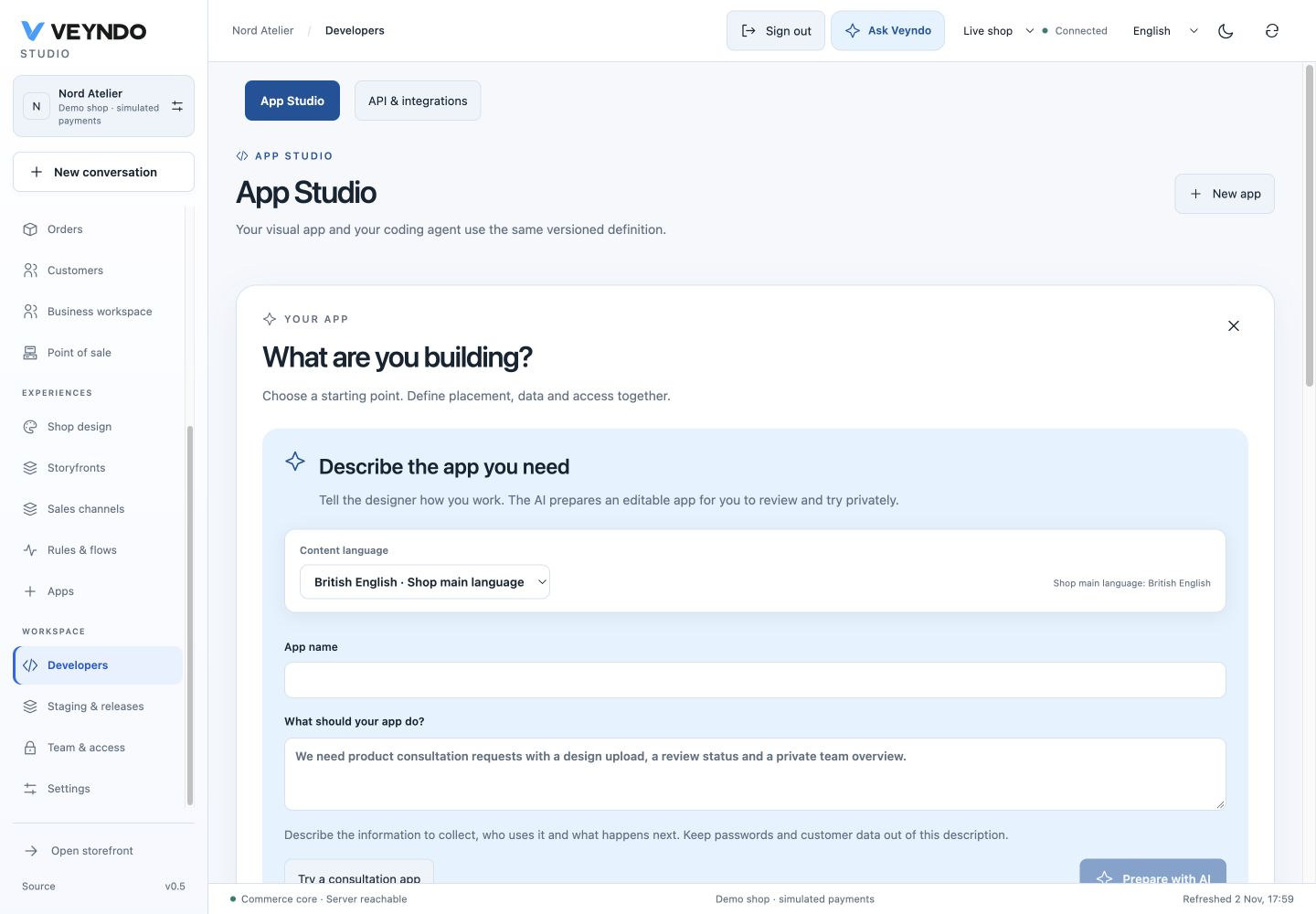
Current shared workspace, captured 2 November 2026. The linked earlier worked examples preserve their original field definitions and outcomes.
Before you start
- Run VEYNDO locally or sign in to your merchant Studio. Use a synthetic shop when following the data-writing and automation examples.
- Open Staging & releases, create a private environment and select it in the top bar. Return to Developers → App Studio → New app. Creation/version management requires your account's app-management rights; data actions have their own narrower rights. See the access contract.
- Match the screenshots by choosing Language → English. This affects UI labels. Content language separately selects which translation you edit. The UI also supports German, Spanish and French. German navigation: Entwickler → Neue App → Gestaltung / Datenmodelle / Verbindungen / Coding-Agent.
- Save a useful draft before choosing another example. Replace current draft? replaces the active draft; it does not delete saved immutable versions.
Understand the three previews
| View | What happens | What it establishes |
|---|---|---|
| Design preview · sample data | Passive controls and model labels; no HTTP reads/writes | Layout, field binding and translated captions |
| F5 / Working sandbox preview | Real app records in a fresh, actor-private, expiring environment | Bounded app behavior; no live commerce writes, external service calls or schedules |
| Installed staging app | Approved immutable package in your selected environment | Object-editor integration and persistence with that environment's test data |
F5 does not promise copied orders or customers. An empty Core object picker is expected when that private environment has no matching fixture. To test an order/customer mount, install the package into a staging environment containing the matching synthetic object and open that environment's Orders/Customers editor. Never paste a live or another shop's ID to bypass this boundary.
The same release steps for every workshop
- In Design, select a control and use F4 for properties. Drag/resize in the 12-column raster. Choose Data models for fields and Connections for routes, placements, rights, events and AI access.
- Preview, then use Save new version. A version is immutable; change it by opening Edit as next version, not by overwriting its package.
- In Versions & releases, inspect View exact changes, then Approve & install in sandbox for the reviewed version and selected private environment.
- Exercise the installed app using synthetic data. In Review this app’s release, use Review changes, select the package and publish through the existing release dialog. Package and app-record data are separate selections. Public advice needs selected data publication too; internal test notes usually do not.
- Reopen the live placement with the intended team role. Check both an allowed operation and a denied operation. A visible tab alone does not prove its backend permissions or that a remote provider works.
Earlier worked example: Immutable versions and explicit staging installation

Actual saved versions from the local workshop. Installed versions, pending versions and package review are distinct; this capture is not a live release.
Use AI or an external coding agent
Each workshop includes a prompt. Open Coding agent, enter it and choose the configured provider/model. Generate app draft produces a proposal: review the models, UI and access changes before accepting it. Current-app editing uses bounded JSON Patch; identity, versions and backend validation remain host-owned. Provider calls may consume your configured service's quota or balance.
Alternatively, enter the task, choose Codex or Claude Code and Export development task. Work in the app's own directory; import the returned Manifest using Apply agent JSON to canvas, review it and follow the same release loop. The browser does not launch an unrestricted coding shell.
Earlier worked example: Coding-agent task and Manifest import use the existing contract

All app implementation, UI, styles, translations, templates and app-local tests
stay in extensions/apps/<your-app>/ or an independent private repository.
Installation registers the package; it never copies app source into core or
shared frontend folders. Ownership and execution boundaries.
Translate once, in the selected language
Use Content language for app names, menus, model/field labels, choices and messages. Missing values inherit the shop's main language; explicitly empty optional content remains empty. Keep technical IDs and choice values stable. Ship bundled UI vocabulary in English, German and Spanish, with French where supported. Translation workflow.
Troubleshooting and evidence
| Symptom | Check |
|---|---|
| Pattern asks to replace a draft | Save/export the active work first; confirm only when replacing it is intended |
| Object picker is empty | Selected environment and actual object fixtures; F5 is a fresh private context |
| Save is rejected | Required fields, core reference, current revision and action/team rights |
| Generated app is rejected | Read native validation errors; preserve storage types and access; revise the task |
| Public product card is missing | Installed active package, product context, public model/list action, surface and released records |
| Timer/service does nothing in staging | Expected: external delivery and schedules are disabled there; use a disposable live test shop plus local fixtures |
| ERP service is unavailable | Operator service URL, approved package digest, server credential and service health |
The inline shared-workspace images were captured on 2 November. Exact earlier
worked examples remain dated source links. Current captures and
earlier workshop inventory distinguish
draft/design views from saved records. The existing real PostgreSQL app_assistants suite covers
installation, customer/order context, rights, public/MCP denial, service calls,
signed webhooks, flows, cron and restart. The individual guides map to existing
regressions. These checks do not certify an actual merchant ERP or paid provider.
Visual editor reference · App platform · Connected workbench · Testing