
English source · 4 min
Workshop 2 — Private returns workspace
Add an order-bound case form for return reasons, review status and internal notes. Use it inside the order editor, with app-owned storage and existing team rights. This app handles cases; financial refunds remain in the payment state machine.
Workshop setup and release steps · Canonical starting package
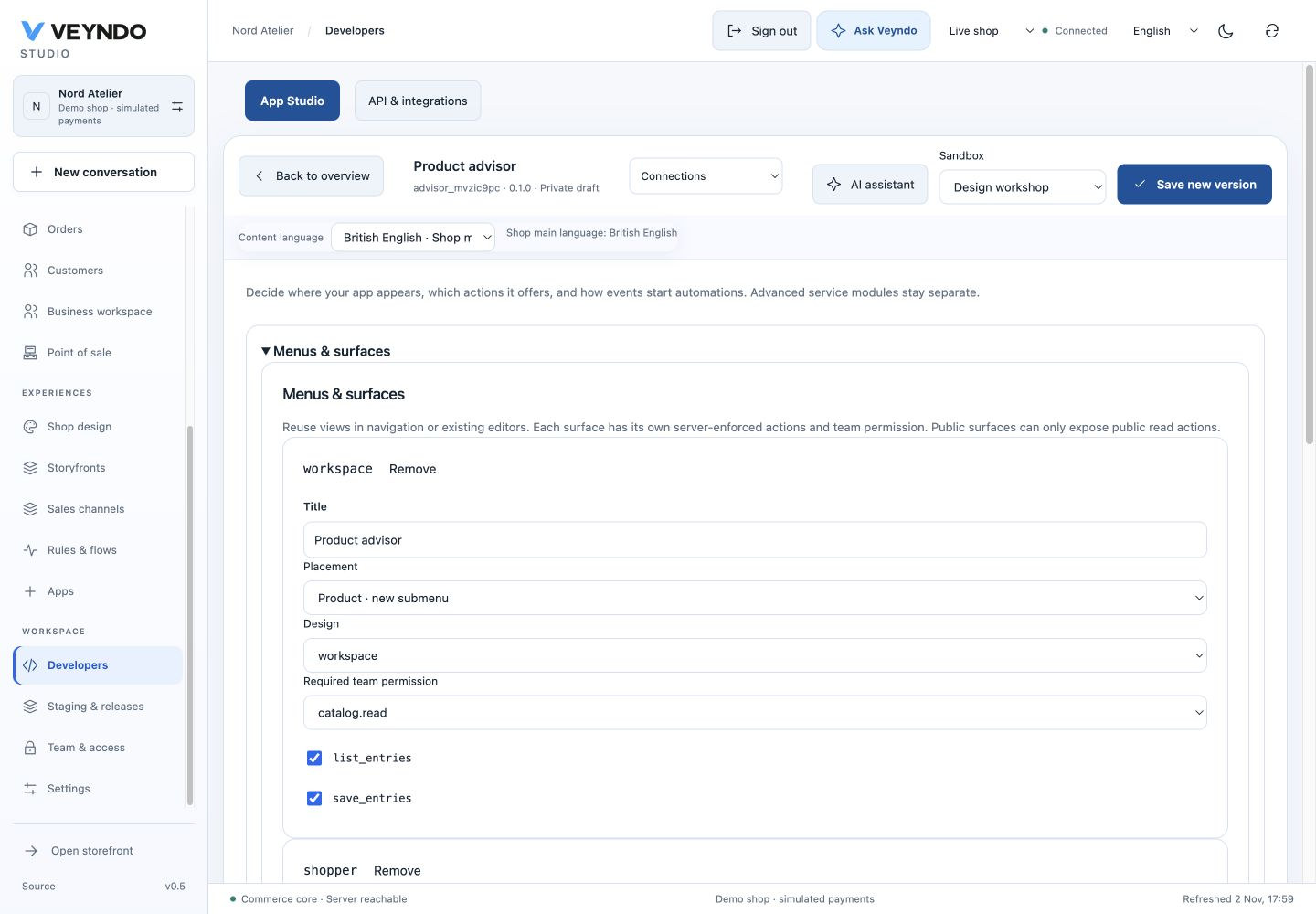
Current shared workspace, captured 2 November 2026. The linked earlier worked examples preserve their original field definitions and outcomes.
1. Choose the order-bound pattern
Open Developers → New app → Returns workspace. In Data models, inspect the six existing fields before adding anything:
| Field | Purpose | Contract |
|---|---|---|
order_id |
Owning order | Required, indexed, coreReference: order |
title |
Case subject | Required, translated |
body |
Reason | Translated |
status |
Review state | Required choice: new, review, received, closed |
received_on |
Date received | Optional date |
notes |
Internal working notes | Private plain text |
Earlier worked example: App-owned initial state, permitted transitions and immutable order reference

Actual 12 October local editor. The app owns its states and immutable order reference; the shared API enforces the same contract. No returns implementation files or arbitrary columns are added to the core order module.
2. Edit the workflow visually
In Data models → Record workflow, inspect the initial state, allowed transitions
and immutable order reference. The package already owns new → review → received → closed
and the alternative review → closed. These are enforced by the host transaction;
a payload cannot skip them.
In Design, keep the table and form bound to order_id → orderId. The Save
button has three instructions: validate the form, call save_entries, refresh
the table. Double-click it to inspect code-behind. This pattern's BASIC equivalent is:
Validate editor
Call save_entries(editor.Record)
records.Refresh
It is a bounded encoding of the shared AST. It cannot run arbitrary VBA or call an undeclared refund endpoint. Add translated captions such as Return cases and Review case through the current content-language selector.
In Connections, retain Order · additional section, orders.read for the
surface/list action and orders.write for save. Model public access, public
routes and MCP exposure stay off. Enable a Flow action only deliberately; a Flow
still needs current action rights and a valid order reference.
3. Exercise the installed staging app
F5 verifies the private runtime, but a fresh F5 environment may have no orders. For the complete order integration, use a staging environment with a synthetic order, save the app version and approve its installation there. Open Orders → that order → Returns workspace.
Enter Size exchange, reason The ordered size does not fit, status New and an internal note. Save, reopen the order and confirm persistence. Change the status to Under review, save, then select Received and Closed with one save per transition. No page reopening is needed; the form retains the confirmed revision. The record selector also lets you create another case for that order. This is the case status; the original order/payment status and amounts must remain unchanged.
Earlier worked example: Closed return case with received date preserved after a browser reload

Actual local app at order RAC-cbcfc9f0. New, Under review, Goods received and Closed each required one save. The received date and Closed state survived reload; the original order and simulated authorization were unchanged.
Try the app with a read-only teammate. The editor must not authorize saving. Attempting a foreign order reference must fail at the backend, without creating a case for the other shop. Follow the common release steps and release the package separately from synthetic case data.
Ask the coding agent
Extend this Returns workspace with a
translated inspection summary. Keep order_id immutable as the owned order
reference. Add a bound date picker in the existing form and retain the validated
save/refresh handler. Keep all records private, orders.read/orders.write rights
and MCP off. Do not initiate refunds or change order/payment states. Use the
same Manifest and app package; do not create a parallel returns subsystem.
Inspect how the new input joins the existing form buffer. It must identify one matching model/record/form. Typing should remain local until the explicit save.
Ownership and regression evidence
All pattern fields, UI and save instructions live in
extensions/apps/returns-workspace/manifest.json. The shared runtime validates
references, rights, revisions and bounded handlers. Frontend pattern tests and
the real app_studio / app_assistants PostgreSQL suites cover order-bound save,
denied writes and context isolation. No refunds are implemented by this example.