
English source · 10 min
Visual App Studio
Install or update a private app package
In Apps, use Import app package and select its JSON manifest (up to 48 KB).
Veyndo reviews the exact package before presenting its version, digest, permissions,
and upgrade checks. Confirm installation only after reviewing those changes.
The existing server checks still enforce apps.manage, package approval, version
compatibility and data migration readiness. Changing the selected manifest clears
its previous consent. Provider credentials belong in the private service or the
installed app configuration, never in an uploaded manifest.
Describe the app you need, review its connected forms and administration views, then try real records privately. Product relations, uploads, review states and installation settings belong to the same versioned app definition. The visual editor and coding agent continue editing that definition.
Complete illustrated consultation-app journey and latest public model and installation observations.
See the connected AI workspace for the 20 October context, reviewed private execution, complete app composition, real preview, editable list handoff and remembered merchant-guidance workflow. Current status.
12 October workbench update: editable app patterns, explicit AI/agent proposal review, native control generation, approved catalogue translation jobs and scoped personalization. How to use it, ownership and verification boundaries.
App Studio and coding agents edit one Manifest. The same renderer, action gateway, permissions and model schema power private previews and published apps. Open Studio → Developers; choose a guided app type or click an existing app's Edit card.
Start building: five illustrated workshops take you from a working pattern or assistant to product advice, private returns, customer fields, scheduled flows and an ERP service contract. They include current English screenshots, practical tests, agent prompts and the shared version/release loop.
Connected business pattern: configurable furniture joins material records, dimensions, bounded surcharge rules, native company approval and saved-input reorder. Its local integration evidence and outstanding hosted checks are explicit.
Start from a description
Open Developers → New app, name the app and describe the information, people and next steps. Try a consultation app fills an editable example with product requests, a design upload, review status and a responsible-team setting. Prepare with AI starts an ordinary private draft and opens the shared agent. If the shop has no sandbox yet, the same action creates its first private stage.
For an empty private app, the model describes data, setting declarations and registered admin placements. The host connects the corresponding lists, forms and validated save buttons in the existing Manifest. Review the proposal, open the private preview, select a real test product and exercise the upload and saved record before publication. Continue editing any generated control in Design.
Installation settings are declared in App settings; configure their values under Apps → the installed app after publishing. Product-bound uploads remain private. Package-only release leaves test records in their private environment. Restoring an earlier interface creates a new immutable version and preserves compatible current records. Observed complete local journey.
New-app preparation uses the versioned app-brief@2 contract for typed field
constraints. Required flags and status choices remain their own properties. The
ordinary native validator checks the generated package. Existing-app editing and
advanced package import retain their existing contracts.
The development loop
- Choose a frontend/admin/combined/payment/shipping/integration/event/cron app assistant. It creates normal entities, actions and surfaces, not a hidden blueprint.
- In Design, use a 12-column form raster. Drag controls from the toolbox, snap positions, resize by handles, use Ctrl/Command for multi-selection and align or distribute selected controls. Narrow screens render the same layout as a stack.
- Press F4 for properties: translated caption/tooltip, geometry, visibility, enablement, tab order, model/field/context binding. Geometry properties can be sorted alphabetically or by their defined category. Tab-order mode assigns order by clicking controls. An optional Classic appearance affects the designer only.
- Double-click an input/button for code-behind. Visual instructions, BASIC and typed JSON edit the same bounded AST. Completion buttons insert current actions, form validation and refresh targets. Calls still need the surface allowlist.
- In Data models, add rich field types and validation. The relationship diagram accepts dragging a field onto a target model. Create workspace from model adds a grid, linked record form and a validated save button.
- Press F5 for a private one-hour preview. It creates actual actor-private logical app models/records through the existing registry. Changes hot-reload after validation. No saving/staging/publishing is required to try a draft. Preview services cannot send external events, place orders or execute live payment/provider actions.
- Use the debugger to pause before instructions or at a numbered step, continue, stop and inspect bounded operation metadata. It does not log customer records or credentials. This debugger controls UI instructions, not a remote process.
- Save an immutable semantic version, use Check before installing to inspect its migration against the selected stage, review and install it in staging, then release the selected app package. App records require their own explicit release selection.
Choose the right test environment: F5 creates an actor-private preview from the parent live catalogue. A product created only in a separate ordinary sandbox is not automatically copied into that preview. To test an app against that sandbox's products, save the app version, check and install it in the selected sandbox, then open its installed native view there. Package publication never implicitly publishes its test records or files.
Server drafts autosave after 500 ms with optimistic revisions. They are private to the actor and shop, restored before edits and bounded to twenty drafts/user and 64 KiB/draft. Unsaved or failed saves retain a before-unload warning. Ctrl/Command+Z uses manifest undo/redo; F4/F5 use the same controls as the toolbar. Immutable saved versions and recoverable App Studio trash are separate from autosaved drafts.
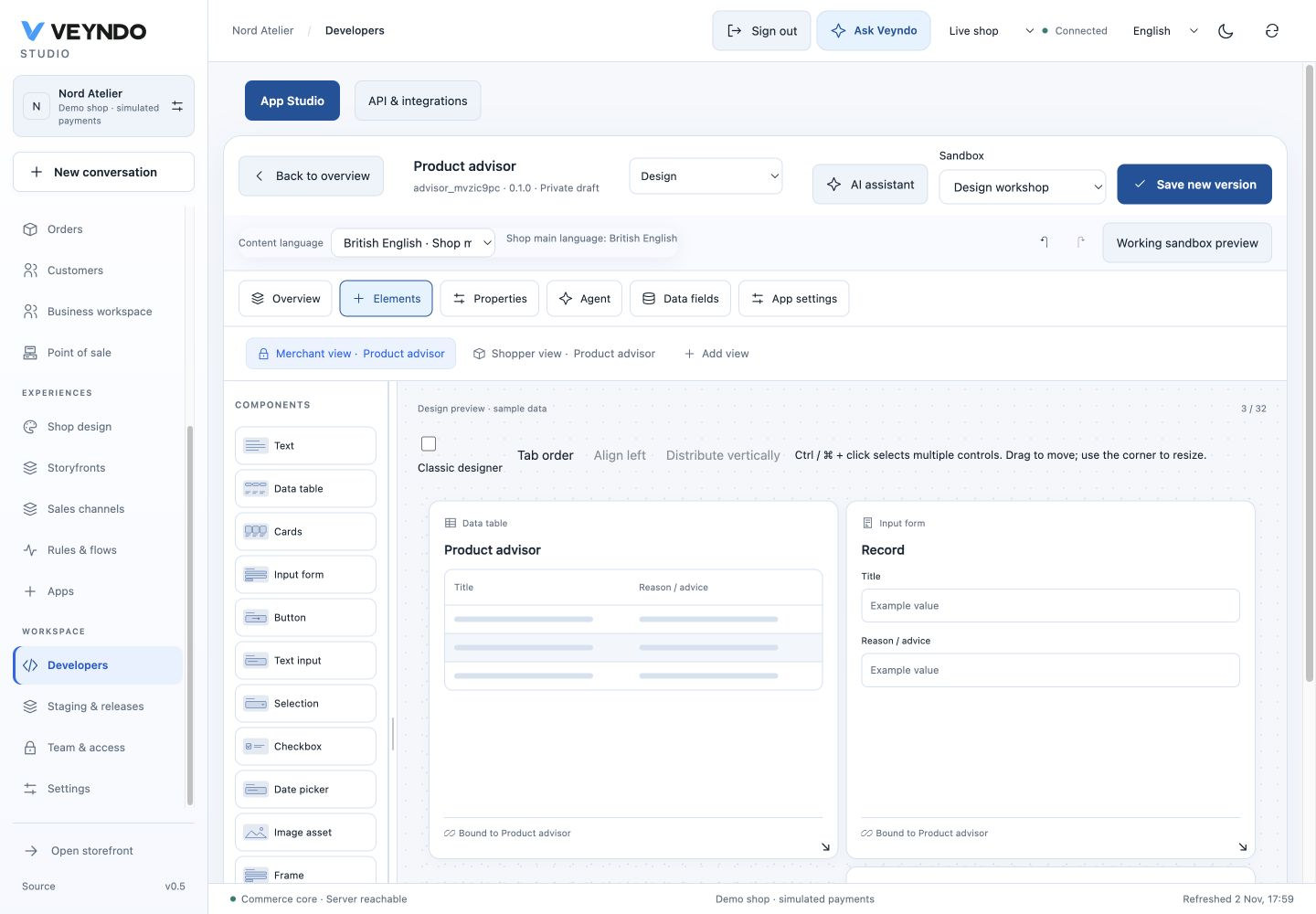
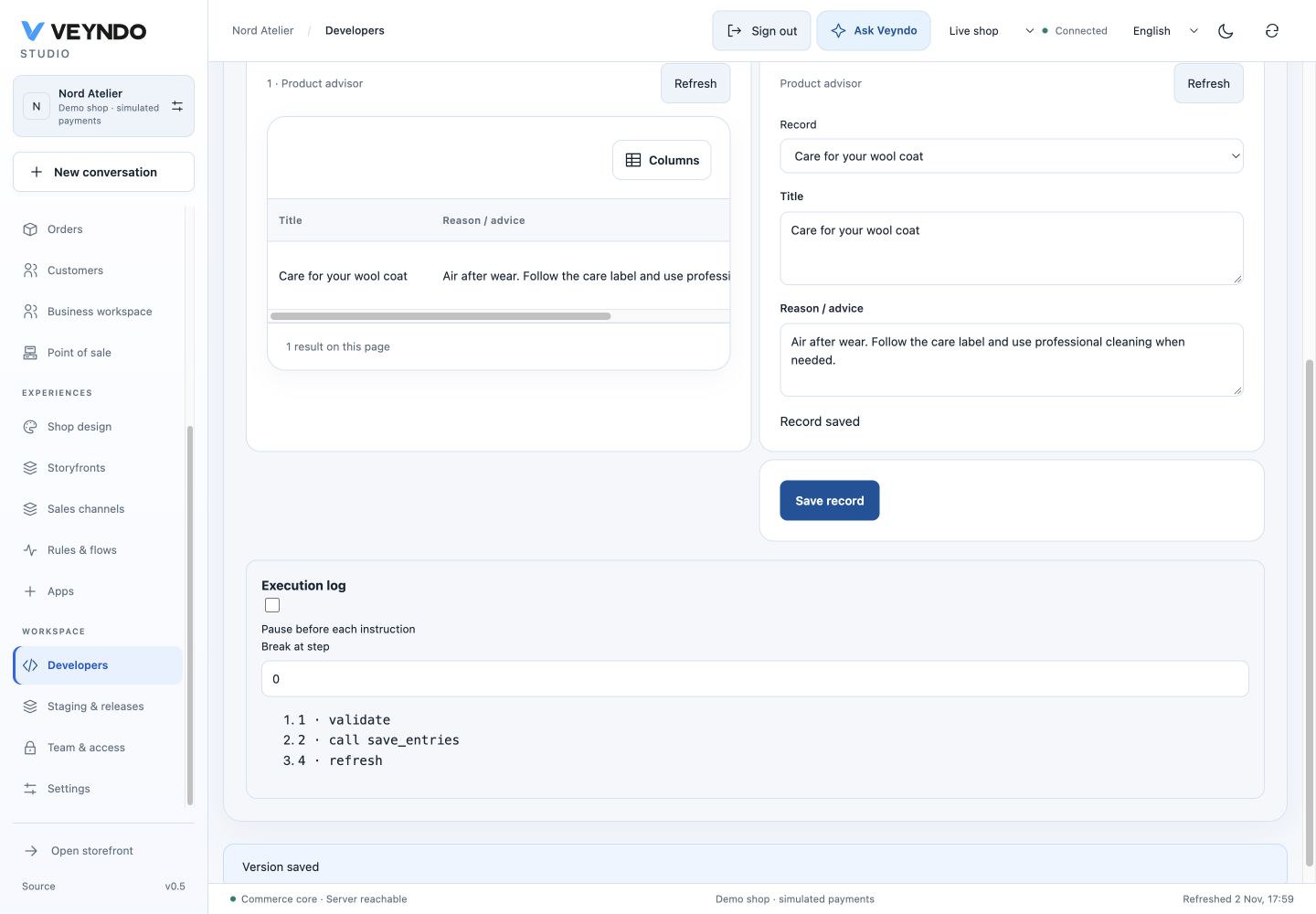
These 2 November captures use the actual compiled Studio, Rust gateway and isolated PostgreSQL instance. The Product advisor preview saved a synthetic coat-care record. See capture provenance.
Controls and behavior
Text, TextBox, ComboBox, CheckBox, DatePicker, Button, table/cards/form, Image, Frame/Tabs, KPI and Chart are host-native controls. Tables can enable inline record editing with real optimistic revisions. Image/file fields use the searchable asset picker and private preview; uploads are available in product-bound editors. Timers are persistent UTC Schedules, not uncontrolled browser loops.
The AST has Set, typed If, Call, translated MsgBox, Navigate, Refresh
and Validate. It is loop-free, bounded in depth/count and independently validated
by Rust against current blocks/actions/model fields. It is not JavaScript eval,
VBA or an unrestricted scripting language. BASIC source is a convenient encoding of
that AST; structured object expressions use the visual/JSON editor.
Validate guide_form
Call save_guides(guide_form.Record)
guide_grid.Refresh
MsgBox {"en":"Saved","de":"Gespeichert","fr":"Enregistré","es":"Guardado"}
The Menus & surfaces editor reuses views in Studio navigation or existing product/customer/order editors. Each mount has one translated label, its team permission and explicit allowed actions. Public mounts allow only public reads.
Server modules edits typed WIT component source and the four commerce hooks. Components read bounded immutable cart/product/app-record snapshots, with no network or SQL imports. Source must implement the published ABI; invalid components fail before installation. The snapshot-pricing example provides executable source. The browser does not compile arbitrary PHP/Rust, deploy an external service or launch Codex/Claude shell commands. Those use the existing external app/development task path.
Shared contract and translation
flowchart TD
  Visual[Visual controls / properties / logic] --> M[Manifest]
  Coding[Coding agent / JSON import] --> M
  M --> V[Server validation and consent]
  V --> P[Actor-private F5 registry]
  V --> B[Immutable build and staging]
  P --> R[Native renderer and surface gateway]
  B --> R
  R --> D[Typed tenant app records / existing core callbacks]
The dynamic generation schema is fixtures/app-studio-schema.json, exposed by
GET /api/developer/schema and MCP developer.task. Rust specializes text maps
using every enabled shop language. One selected content language edits captions,
fields, menus and messages; missing translations inherit the shop main language.
OpenAI strict fixed-object wire schemas encode dynamic JSON as a string, restore
it on the server and then run domain validation; Claude/local adapters preserve
native JSON. This adaptation does not bypass the shared manifest contract.
Improve the current app uses bounded JSON Patch against the current Manifest.
Extend the complete app instead prepares a coherent new immutable version,
including new models, settings and native views together while preserving the
existing contracts. Identity and version stay host-controlled; native validation,
access preservation and proposal review still run before staging. Patch values are
JSON-encoded only on the model wire. No-op, unauthorized and conflicting edits are
rejected. If a generated candidate fails native validation, the same provider may
make one bounded repair with the exact error and original Manifest, under the
same quota/lease. The result must pass the same admission; this is not an open
repair loop. Prompt app-generation@4 and rendered-context provenance identify it.
Use Test this version privately to try the proposed immutable build in the actor-private native runtime before adoption. The connected workspace guide records the configured-model care-note example, real multilingual record writes, selected package-only publication and central settings after reload. Existing workbench test boundaries retain their dated scope. The assistant can add a missing native order/quote review workflow; proposal review displays its steps, conditions and additional rights. Existing workflows remain protected from AI patches. See native app workflows for deliberate version changes, consent and the connected verification boundary.
An extra input for an existing record joins its form's local buffer only when the model and record ID identify exactly one form. Saving still uses that form's validated action and record revision. Two possible forms, different models or records, and protected core-reference fields never create an implicit binding.
For Codex or Claude Code, export a credential-free development task with the current Manifest, schema, guides and MCP bridge configuration. Import the result, review permission additions and stage it through the same operations.
Limits and tests
Sixteen views, 32 blocks/view, twelve models, sixteen fields/model and 24 actions/ routes keep previews and parsing bounded. Per-app storage has database-enforced row/byte quotas; file quotas remain with the existing product asset owner. Schema migrations are explicit and atomic; larger/relation changes are offline. Full platform and trust boundaries, security.
Frontend regressions exercise real designer edits, undo, private autosave/conflicts,
AST calls/validation, read-only surfaces and pinned UI loading. Registered
app_studio, app_preview, app_callbacks, app_schema, app_assets, app_jobs,
app_components, app_distribution and existing staging/payment suites exercise
actual Rust/PostgreSQL paths. Browser rendering and SQL/asynchronous adapters are
not covered by the extracted Lean proofs.
Map app data into the knowledge graph
In Connections → Knowledge graph mapping, first enable AI access for a model
with a native list action. Choose the selected fields and an app-owned node type.
For product/customer/order or app-record references, optionally choose an app-owned
relationship type. The label uses the same content-language selector and inheritance
as all app fields. The coding agent edits this same intelligence.ontology manifest.
The care knowledge example demonstrates current records through API, MCP and authorized planner context. This projection retains native record revisions and tenant rights; it does not turn app text into confirmed public product claims. Deleting or renaming a draft model updates mappings; removing a field drops its mapping without silently exposing another field.
Native POS surfaces
POS channels expose admin.pos.catalog, admin.pos.cart and admin.pos.receipt
through the same visual designer and coding-agent Manifest. These are private
merchant surfaces requiring pos.use; catalog/cart receive salesChannelId,
and receipts receive orderId. Existing app record scopes, explicit install
consent and native order references remain authoritative. Service apps may
subscribe to projected pos.sale_created / pos.sale_completed events.
Register setup, full commerce call path and limits.
Modular B2B and EDI — 12 October 2026
Native company units, current employee rights, private catalogs, currency-bound
budgets, separate approval, RFQ negotiation, quick order and repeat lists reuse
the existing checkout, inventory, order, document and Flow owners. The Studio and
customer account use the same API/MCP contracts. Setup, source owners and precise
B2B comparison. The independent extensions/apps/edi/ package owns
bounded EDIFACT/UBL/cXML parsing, mapped private requisition import and immutable
native document export; no Core codec or second ledger. EDI profiles, deployment
and network/certification limits.
Current concept and implementation status
The app-system status distinguishes the working visual/agent builder from the complete business-capability programme. Immutable development "builds" validate and store a Manifest; they do not compile arbitrary Rust/TypeScript source in an isolated build service. Frozen decision examples are synthetic cases, not historical order replay.
Connected App Studio workbench
See the illustrated workbench guide for multiple placements, compact adjustable panels, the contextual AI drawer, model-backed form editing, shared Flow visuals, installed app settings and scoped integration keys. These extend the existing native Manifest, runtime and release owners.
Add fields to native shop objects
In Data models → Extend a shop object, select Product, Customer, Order or Company. The same versioned model then supplies private native detail fields and optional directory columns. Read core object extensions for current rights, exact indexed filters, agent context and the separation of configuration from live customer/order data.