
English source · 5 min
Studio setup, roles and safe delegation
VEYNDO uses the same tenant and permission owners for Studio, HTTP, MCP, API keys, app callbacks and background Flow execution. A hidden menu is a convenience; it is never the security boundary.
Browser walkthroughs
These screenshots use a disposable local shop and synthetic customer records. They demonstrate UI behavior; they are not a claim of public deployment.
Archived capture from the preceding release: Marketplace channel saved through the three-step wizard

Archived capture from the preceding release: App draft retained after returning to the overview

Create POS and marketplace channels
Open Sales channels → Create channel. The first step contains the name, visibility and type-specific settings; the second selects languages and catalogue; the third reviews the configuration before the versioned save.
New channels start in the shop's main content language, independently of the Studio interface language. Missing names, POS countries, languages and catalogue selections receive field errors. A name entered in another language does not silently satisfy a missing main-language name. Existing channels retain the shared translation editor and inheritance. The same backend validates creation, edits, MCP writes and selected publication.
Return from an app example
Back to overview returns to App Studio's assistants and app library. The App Studio tab also returns there. Neither action deletes the current versioned or autosaved draft. Close the assistant to continue the draft, or open an existing version. Private previews are closed when leaving the designer.
Reusable team roles
Open Team & access → Roles. Every tenant receives Owner, Admin, Editor and Viewer definitions. Create a named role, select searchable permissions, then assign it to members or invitations. Every option displays a translated label alongside its technical scope, including API-key and App Studio action selectors.
- Roles are persisted per tenant, revisioned and audited through entity history. Restoring a role creates a new revision and repeats current delegation checks.
- Owner authority is reserved and immutable. The last active owner cannot be demoted. Other standard roles may be edited or paused; only unused custom roles may be deleted after dependency inspection and confirmation.
- Member overrides replace the role's permissions; selecting inheritance uses its current definition. Changing a role affects inherited grants, not independent explicit overrides. A paused role blocks its memberships even with overrides.
- No delegate may grant, retain on reassignment, or reactivate permissions they do not currently hold. Owner assignment additionally requires current ownership. Delegation and invitation acceptance serialize with role/member edits on the same tenant lifecycle lock and recheck the current actor.
- Existing broad settings, catalogue and app/team grants retain documented
compatibility aliases. New channel, automation, developer, environment,
knowledge, overview and app-read scopes support narrower roles. The authoritative
list comes from
/api/auth/access; platform-operator credentials stay separate. - Integration keys intersect their explicit scopes with the creator's current active membership and role on each request. Editing a role never expands a key's original scope. Queued flows and callbacks rehydrate current grants.
Studio filters navigation, direct workspace admission and initial data loading. It refreshes rights on focus and periodically, discarding old views when grants change. Normal same-user session renewal preserves drafts through the login overlay; rights changes reload the affected workspace. Servers still check every request immediately, regardless of an old browser view.
Personal data and shared reads
Customer records, addresses, full orders, order/customer history and document
PDFs require customers.pii as well as their domain scope. An order-reading scope
alone can authorize aggregate overview facts without authorizing customer data.
App callbacks retain explicit non-PII order/customer projections; full records still
require separately declared and approved PII consent plus current creator rights.
Merchant conversations/planning require assistant.use, catalog.read,
orders.read and knowledge.read, since their shared context combines these
sources. App actions retain their additional current permissions.
Flow status and cleaned node/action summaries are readable with
automation.read. Arbitrary stored app/AI outputs can contain data from any
domain; full raw results are conservatively restricted to actors holding all
registered scopes. Staging diffs filter actual records by domain rights; arbitrary
app records additionally require PII access. These are explicit access rules, not
a claim that every arbitrary third-party payload has been classified.
Configure B2B centrally
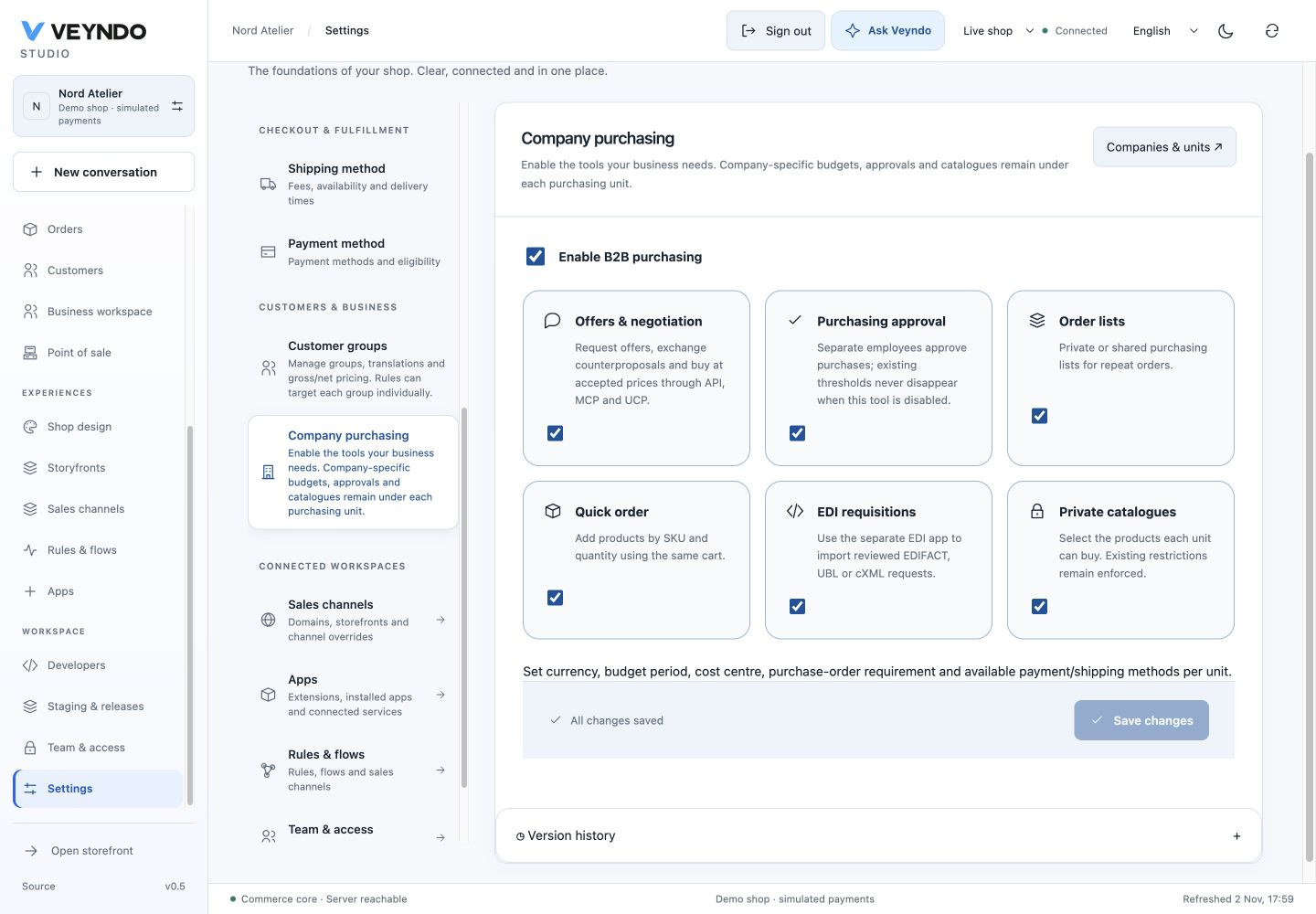
Open Settings → B2B to activate or pause company purchasing, quotes, approvals, repeat-order lists, quick order, EDI intake and private catalogues. The switches are typed fields in the existing versioned commerce settings, using the existing audit and outbox. They are shop-wide security policy and cannot be relaxed through a sales-channel override. Existing installations retain enabled features when the new fields are absent.
Disabling a feature rejects its native HTTP/MCP/UCP/buyer operation. It never waives an existing approval threshold or budget to allow a purchase. Configure financial policy explicitly on purchasing units. Existing stored companies and policies remain inspectable and editable while purchasing is paused.
Companies & purchasing shows the available modules and links to settings.
New company uses one dialog: main-language name, VAT identifier and optional
existing customer. One native b2b.company.create transaction creates the company,
first purchasing unit and optional employee relationship; a foreign/invalid
customer rolls everything back. Customer linking requires the relevant customer
read/write and PII scopes. The searchable picker is debounced and returns at most
20 registered customers through indexed tenant-scoped SQL, with no passwords or
addresses. Guest purchases are not registered employee identities.
Catalog readers can search products, open details and inspect descriptions without being offered product/category creation, uploads or active save controls. Installed app slots retain their own granted capabilities; they do not inherit catalog writes.
Owners and verification
| Responsibility | Source |
|---|---|
| Persisted roles, current grants, history/FKs/RLS | migrations/082-workspace-roles.sql, src/auth/roles.rs |
| Session/key identity and delegation | src/auth/identity.sql, members.rs, invitations.rs, permissions.rs |
| UI navigation and refreshed grants | frontend/src/admin/shell/permissions.ts, useStudioPermissions.ts |
| Shared permission labels and role editor | frontend/src/admin/team/ |
| Channel wizard field validation | frontend/src/admin/channels/ChannelEditor.tsx |
| Native B2B configuration/onboarding | src/b2b/settings.rs, onboarding.rs |
| Bounded customer picker/search | src/operations/customer_lookup.rs, migrations/083-customer-lookup.sql |
| Real concurrent delegation/privacy/MCP checks | scripts/workspace_roles.py, scripts/testing/role_races.py |
| Shared access and setup UI regressions | frontend/tests/unit/workspace-roles.test.tsx, channel, B2B, App Studio and Studio workspace suites |
Run the affected database suites through scripts/verify_integration.py --only
users workspace_roles merchant_operations tenant_isolation automation
channel_management b2b b2b_ucp pos staging. The harness creates its own disposable
PostgreSQL database and uses synthetic people, local providers and simulated
payments. Frontend tests cover visible behavior and denied navigation. Formal
contracts cover their documented pure decision slice, not the whole SQL/UI system.